Tag Archives: Openismus

gnome-lirc-properties: A GUI to configure Infra-Red Remote Controls

We at Openismus will be working on a little GUI control panel to configure remote controls, so you can more easily, for instance, control a media-center application such as Elisa. We are doing this for Fluendo.

It should end up looking something like this and it will basically just give you a working /etc/lirc/lircd.conf file for your remote control:
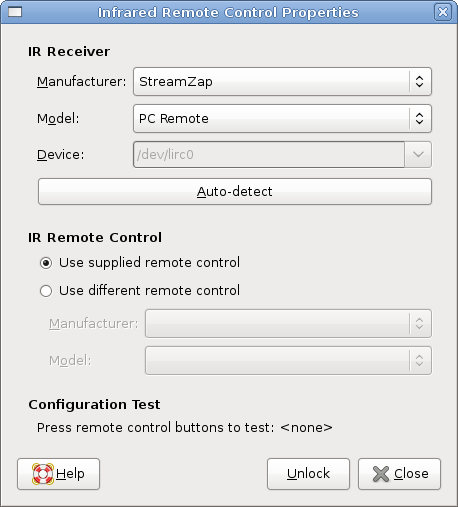
gnome-lirc-properties Screenshot

I’ll make a few posts about this, but first here’s some (opinionated) notes about how I think it works now on Ubuntu without this GUI:

Installing lirc

You select the remote control via a curses UI when you install lirc (or when you run sudo dpkg-reconfigure lirc). We would prefer it to install silently and let the user configure it when he wants to. I think the script for this is debian/lirc.config.in in the lirc debian package, though this doesn’t seem to be the whole story. It seems to use the prewritten configuration files in /usr/share/lirc/, listed in the /usr/share/lirc/lirc.hwdb file, which seem to be supplied only with Debian/Ubuntu.
This creates

  • /etc/lirc/lircd.conf, which maps the key names to the key codes supplied by your IR remote (usually assuming that you are using the IR receiver (if any) supplied with the IR remote control. It’s these key names that an application will receive via the liblirc_client library.
  • /etc/udev/rules.d/85-lirc.rules, which uses /etc/init.d/lirc, which starts “/usr/sbin/lircd –device=/dev/lirc0”.

Custom Configuration

When the lirc package does not know about your hardware, or if it has a bad configuration file, you can use the irrecord utility (installed with lirc) to generate a custom lircd.conf file, which you can move to /etc/lirc/lircd.conf. It checks for key codes and some other aspects of the remote control. Here is an example of an irrecord run. irrecord is a command-line utility which takes input on stdin. Doing this programatically is going to be difficult, probably requiring the creation of a libirrecord in the lirc sources.

Note that the default device for lirc is /dev/lirc, and it doesn’t check for other devices automatically, but applications don’t need to specify the device because they just communicate with lird via liblirc_client. However, the irrecord utility doesn’t use lircd so you’ll need to use the –device option with it too.

The application

The application then creates a .lircrc file (Elisa creates one in /tmp when it starts, and this seems the only sensible thing to do) which maps these key names to “command” names. This seems like a useless extra step because most applications will just invent “command” names which are identical (or near identical) to the “key” names. The entries in this .lircrc must use the same “prog” identifier string as the application has passed to the lirc_init() function – another annoying invitation to failure. This is presumably useful when using one .lircrc file to control multiple applications somehow, but I can’t see how that could ever be useful – a global .lircrc file could at the most be used to _start_ applications, not control them.

Update:: Of course, I do have the strong feeling that remote controls should be just another input device, like mice and keyboards, so the whole lirc daemon thing seems odd. But I’m not a kernel or X programmer. This might even be planned for the future, but I don’t know. We do need something to make lirc work easily now.

Openismus needs another GTK+/GNOME developer

We need another full-time developer at Openismus to start in a month or so. You’ll ideally be a resident of Germany and you’ll have common sense and visible experience with GTK+ and some of the GNOME technologies such as D-Bus. I’m mostly interested in a C coder at the moment, but experience with Python and/or C++ is a plus. You’ll work from home and know that you can. Capable people are hard to find so you probably know if you are suitable. Working for Openismus is quite straightforward, with fairly clearly defined tasks, some choice about what you work on, and a boss who can be persuaded that he’s wrong sometimes.

I am very pleased with our current developers but we can’t wait the 20 years for a clone to mature – it’s just not practical.

Please email me with a CV (any format you like) and a paragraph describing yourself, your experience, and your current development interests.

Update on 1st March 2008: We are still looking, and we maybe need more than one new developer. But you need to be convincing.

Widescreen

The end of the tax year encouraged me to get a new 24″ 1920×1600 widescreen monitor (HP W2408H) for the sake of my back and eyes.

Ubuntu Gutsy (7.10) didn’t work with it automatically, even after a restart. The monitor complained that the input was “out of range”. It seemed to be using too high a sync rate. Doing “dpkg-reconfigure xserver-xorg” fixed it, though I naturally had to use a second PC to do that via ssh.

I was using a 17″ before, so the hugeness and brightness is disorientating. It can rotate too, so I can have a tall thin screen instead, should I ever want that. I’ve seen desks at Google (through the windows) that have two of these side by side – that would be truly useful. Weirdly, drawing of windows is noticeably slow when the screen is rotated. I wonder what that’s about. (Via System/Screen Resolution in Ubuntu. I guess that’s XRandR.)

My graphics card only has VGA output (integrated Intel 915G), so I’m probably not seeing the clearest picture. I should get a separate card with a HDMI or DVI output, but I don’t look forward to the driver problems. It looks like life will be good with AMD/ATI Radeon cards in the near future, but not until the next version of Ubuntu, I guess.

Clutter Tutorial

Over the last couple of weeks, I’ve been writing a Clutter tutorial for Openismus. Clutter is a “2.5D” canvas API maintained by OpenedHand.

Here you can see a preview of the tutorial, though some sections just have TODOs for now. I think it’s already the only place to find a useful description of Clutter Timelines, Effects and Behaviours and how they relate to each other, and it’s the only place that I’ve seen mention of how to manage the refcounting of the various objects. Thanks to the OpenedHand guys for answering my questions so patiently.

I’m waiting for the new high-level Clutter library to be created before completing the remaining sections, because the containers have already been moved out of the main clutter library, and that new library should have some interesting (but maybe not perfect at first) actors for doing scrolling and lists of text.

It’s DocBook, with some scripts to pull in the example code, in the clutter-tutorial module in OpenedHand’s svn repository:

As I’ve done in the past for gtkmm documentation, the examples are almost mind-numbingly simple so people have the best chance of seeing the use of the relevant API. However, there is one slightly more realistic full example. I hope that the containers in the new library will help me to make it prettier.

I guess you should report bugs in the tutorial in Clutter’s bugzilla, in the Documentation component.

gstreamermm: C++ bindings for gstreamer

The latest attempt to create a gtkmm-ish C++ API for gstreamer is making good progress, this time started by Milosz Derezynski for his “Beep” player. Over the last few weeks I’ve tried to help out by solving the more difficult problems such as support for GstMiniObject (a cut-down GObject), and support for GstObject (GObject with a floating reference, like GInitiallyUnowned, and with thread-safe reference-counting, I think). José Alburquerque and Siavash Safi have been helping out too.

That’s done and we can now actually play an Ogg Vorbis file, as seen our first example. I’m fairly confident that gstreamermm can now become finished, useful and stable with a little more effort.

svn: http://svn.beep-media-player.org/gstreamermm/trunk/. though I ‘d like to move it to the GNOME svn if I can persuade Milsoz. It’s also in jhbuild.

Update:: gstreamermm is now in GNOME’s svn.

libepc

I’m very pleased with the libepc library that Mathias Hasselmann created for Glom. I much prefer having the Avahi and network communication wrapped up in a simple separate library rather than mixing it in with Glom’s source code. I don’t want to deal with avahi, libsoup and gnutls if I don’t have to.

Glom will effectively use it to discover and load .glom documents over the network from other Glom instances. I suspect that it will be useful to a few other applications, but if not then it will still have been a good exercise in modularity.

I’ve already reviewed a few iterations of the library. Mathias and I are both fussy coders, though in different ways, so that’s why it already has full and meaningful documentation, tests, and examples. But we would welcome feedback so we can show how seriously we take documentation and API. I’ve added it to jhbuild.

Some new C++ bindings

We released some extra C++ bindings recently:

gtksourceviewmm-2.0

I updated Dodji’s gtksourceviewmm to wrap the new gtksourceview-2.0 API. Here’s the svn, and the tarball download.

libnotifymm and hildon-notifymm

Johannes Schmid created libnotifymm (svn, tarball) to wrap libnotify, and we also wrapped Maemo’s hildon-notify, though there’s no documentation to say what this does beyond regular libnotify. I suspect that Maemo should just use a port of libnotify without requiring use of special API.

There are lots of examples in the libnotifymm source code. It seems quite simple, and particularly useful for code that uses Gtk::StatusIcon.

Glom 1.6

I released Glom 1.6. It’s mostly just a port to libgda 3.0 (from libgda 1.2). That makes life easier for people working on the code. We might have broken some things while doing that, so please do report bugs so we can fix them.

Glom 1.8 should be out in approximately six months from now. It’s likely to include an easier layout designer, using drag-and-drop, and a client-only Maemo version for the Nokia Internet Tablet.

Work on Modest and C++ for Maemo

Some public statements allow me to now mention some work I’ve been doing recently for Openismus, for Nokia, though the heavy cloak of secrecy still hangs over many Nokia things by default.

Maemo Modest

Since Nokia’s Dirk-Jan Binnema talked about Maemo’s new Modest email-client at the GNOME conference (his slides), I can mention that some of the Openismus people (myself, Armin Burgmeier, Johannes Schmid, and Christian Kellner) have been working on this project quite intensively since May 2007. It consumes most of my time at the moment.

Modest is an email client for the Nokia Internet Tablet that’s actually usable, meaning it can handle real world amounts of email, via both POP and IMAP, and it has presets that make it easy to set it up to use many common email accounts, such as Yahoo and Gmail. If we can get everything done (Nokia’s quality requirements are sensibly high) then this will be used by a lot of people.

It uses Tinymail, which uses Evolution’s camel code, so we obviously get most of the functionality that Evolution has, without using Evolution’s UI, but everything is much faster and responsive. It is by far the best way that I can imagine to write an email client now, not that there’s a lot of competition. I say that even though I think that tinymail is currently not a lot more than a glorified wrapper for camel. It’s just that it’s a very good wrapper. Good APIs cause applications to be better and save developers time. It will get really interesting when there’s a future version that can use something other than camel. Philip Van Hoof knows the Tinymail and camel code very well and is incredibly responsive to our needs. While I might be up all night worrying about a problem, Philip has usually been up all night fixing it properly.

We’ve made some small but significant changes to tinymail’s version of camel (camel-lite) – a big investment of time. I think that Evolution should be ported to our camel-lite in the near future, to get some improved stability (general fixes and better thread locking to avoid intermittent hangs and crashes) and improved error codes (allowing better error messages), and obviously to get the performance improvements (though a one-time cache upgrade would be needed, I think). That would be useful even if they never decide to use Tinymail, which they probably should do too one day.

Maemo C++

The updated C++ bindings for Maemo, which I mentioned recently, will be released and supported by Nokia (with help from Openismus) as part of their regular SDK. This means that people can feel safe about using C++ and gtkmm to develop Maemo applications, should C++ be their programming language of choice.